
Robots.txt
A robots.txt file tells search engine crawlers which parts of your website they can access and which parts they should avoid.
- Robots.txt is a plain text file placed at the root of your domain (for example: https://example.com/robots.txt).
- It uses rules like "User-agent", Disallow, and Allow to guide how bots crawls your website pages.
- Proper robots.txt setup improves crawl efficiency by keeping bots focused on your most important pages.
- A misconfigured robots.txt can accidentally block critical pages or resources from getting crawled and hurt the website's SEO performance.
- Robots.txt controls crawling, not indexing - blocked URLs can still appear in search results if they’re linked elsewhere or are already indexed.
What is Robots.txt?
A robots.txt file is a simple text file that gives instructions to search engine crawlers about which parts of your website they are allowed to crawl and which parts they should not be crawling.
It follows the Robots Exclusion Protocol, a widely supported standard that major search engines use to guide crawling behavior.
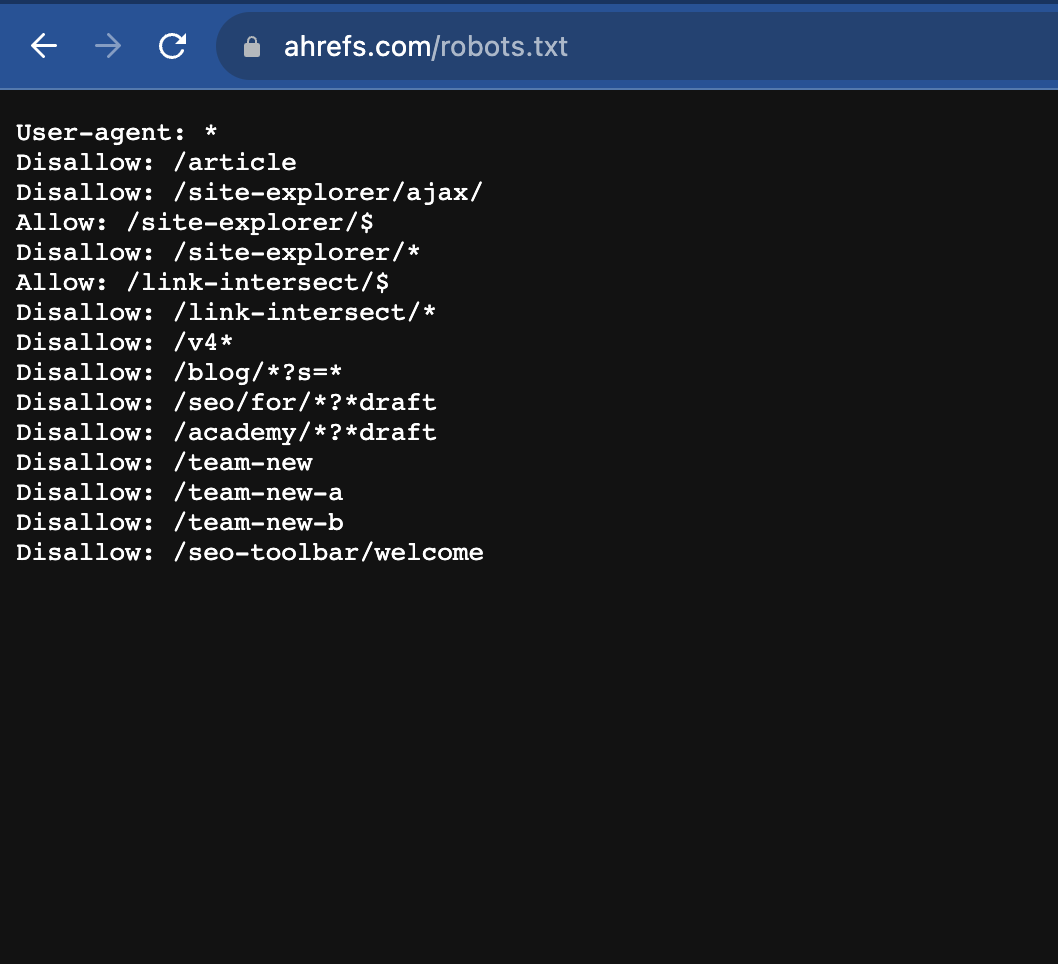
A sample of the Robots.txt file looks like the below:
Where is Robots.txt Located?
Your website's robots.txt file must be placed in the root directory of your website. That means it should be accessible at:
https://example.com/robots.txt
Search engines look for robots.txt in this exact location before crawling your site. If the file is missing or placed elsewhere most crawlers will ignore it.
Example of a basic robots.txt rule:
    User-agent: *

    Disallow: /admin/
This instructs all bots not to crawl the /admin/ section of the website.
Robots.txt Best Practices
A well-configured robots.txt> file helps search engines crawl your website efficiently without wasting time on low value or sensitive areas. But one wrong rule or incorrect syntax in Robots.txt can block critical pages and harm visibility in search engine result pages. Use these best practices to keep your robots.txt clean, safe, and SEO friendly.
Do’s
- Place it at the root of your domain: The Robots.txt file of your website must be accessible at https://www.domain.com/robots.txt to be recognized by crawlers. If you place the Robots.txt in any other location, and the crawlers will ignore it.
- Use User-agent rules correctly: Target specific bots (like Googlebot) only when needed; otherwise use * for all user-agents and bots.
- Block only low-value or private sections of your website: Robots.txt should be used to block unnecessary sections and URLs of your website from crawling. For example, admin areas, internal search pages, staging paths, or faceted filter URLs.
- Use Allow for important exceptions: If you disallow a folder but want one file or URL crawled inside it, use an Allow rule to add the required exception.
- Add your XML sitemap URL: Including Sitemap: helps search engines discover your XML sitemap faster which in turn helps discovering, crawling and indexing your website easier for search engines.
- Keep rules simple and readable: Shorter, clearer Robots.txt files are easier to manage and reduces mistakes.
Don’ts
- Don’t block your entire website: Avoid Disallow: / unless you intentionally want all bots not to crawl your website.
- Don’t use robots.txt to hide sensitive data: Robots.txt is public file and not a security feature. Protect sensitive areas with authentication instead.
- Don’t block critical resources: Blocking CSS/JS files can prevent Google from rendering pages correctly and may hurt SEO in some scenarios. It is indeed a good idea not to block CSS, JS and other resources which are required to render the page properly at the user's end.
- Don’t rely on robots.txt to prevent indexing: Robots.txt controls crawling, not indexing. Use the noindex robots meta tag when you want to control which pages on your website should not be indexed.
- Don’t create overly complex patterns: Unnecessary wildcards and long rules can lead to unexpected blocking of URLs or entire directories.
- Don’t forget to update it: As your website grows, review robots.txt from time to time to ensure new sections aren’t accidentally blocked.
Good vs Bad Robots.txt Examples
Let's see some real examples of good robots.txt implementation and bad robots.txt implementation. Good rules in Robots.txt keeps your website content crawlable while Bad rules in Robots.txt often blocks important sections or even the entire website and can cause serious SEO issues.
Examples of Good robots.txt implementation
| Example | Why this is good |
|---|---|
User-agent: *
|
Blocks unnecessary admin pages while still allowing a commonly needed endpoint. This keeps crawling efficient without breaking important site functionality. |
User-agent: *
|
Prevents crawling of internal search and filtered pages, which are often low-value and can create lots of duplicate URLs. Helps conserve crawl budget on large sites. |
User-agent: *
|
Stops crawlers from wasting time on transactional or user-specific pages that typically don’t need to appear in search results. |
Examples of Bad robots.txt implementation
| Example | Why this is bad |
|---|---|
User-agent: *
|
Blocks the entire website for all crawlers. This can cause pages to stop being crawled and may severely impact organic visibility. |
User-agent: *
|
Accidentally blocks a high-value content section that is often meant to drive SEO traffic. A common mistake during site changes or migrations. |
Disallow: /private-data/
|
Missing the User-agent directive, so the rule may be ignored by crawlers. Also, please note that robots.txt is not a security tool so sensitive areas of your website should be protected with authentication instead. |
Whenever you are modifying the content of the Robots.txt file, remember to always test changes before deploying them to avoid accidental site-wide crawling issues. A good idea is to ensure at least two pair of eyes have validated and agreed to the changes, before it's made live on the server.
What Robots.txt Can and Cannot Do
Robots.txt is a crawl-directive file.
It helps you guide search engine bots, but it has it's limits. Understanding what a Robots.txt can and cannot do will prevent common SEO mistakes.
What Robots.txt CAN Do
- Control crawling behavior: Robots.txt tells bots which sections of your website they should or should not crawl.
- Reduces unnecessary server load: Robots.txt limits bot hits on pages that don’t add value, especially on large websites.
- Improves crawl efficiency: Robots.txt guides bots towards important pages by blocking low-value or repetitive URL paths.
- Manages crawl budget: Robots.txt helps search engines spend their crawl resources on pages that matter the most.
- Blocks crawling of utility areas: Robots.txt can prevent crawling of admin pages, carts, checkout flows, and internal search results if you have properly defined user-agent and disallow rules.
What Robots.txt CANNOT Do
- Guarantee a page won’t be indexed: A URL can still appear in search results if it’s linked from elsewhere, even if crawling is blocked through Robots.txt.
- Secure private content: Robots.txt is public and not a security feature. Sensitive pages should be protected with login or authentication methods.
- Remove pages already indexed: If a page is already in Google, blocking it through robots.txt alone won’t remove it from Google's index.
- Force search engines to forget a URL: Robots.txt cannot be used to force search engines from forgetting a URL. Instead, Use noindex meta tag, proper HTTP status codes or removal tools in Google search console for de-indexing URLs of your website.
- Stop all bots on the internet: Major search engines obey robots.txt, but malicious scrapers may ignore it. So simply defining a Disallow statement in Robots.txt may or may not be sufficient to block all bots.
Important: If your goal is to keep a page out of search results, don’t rely on robots.txt alone. Use a meta robots noindex tag or restrict access behind authentication.
FAQs on Robots.txt
No, it’s not required. But it’s highly recommended because it gives you control over what search engine bots crawl and helps you manage crawl budget—especially on larger sites.
Not necessarily. Robots.txt mainly controls crawling, not indexing. If a blocked URL is linked from other pages, it may still show up in search results without a full snippet.
Use a meta robots noindex tag (and allow crawling so Google can see it), return a 404/410 status code for removed pages, or use Google’s removal tools in Search Console if needed.
Robots.txt must be placed at the root of your domain, like: https://yourdomain.com/robots.txt. Search engines won’t look for it in subfolders.
No. Each domain (and subdomain) can only have one robots.txt file. If you have subdomains like blog.example.com, they need their own separate robots.txt file.
Google and other major search engines generally respect robots.txt rules. However, robots.txt is not a security feature and malicious bots or scrapers may ignore it.
Usually, no. Blocking CSS/JS can prevent Google from rendering your pages properly, which may hurt SEO. Only block assets if you have a specific reason and have tested the impact.
Robots.txt tells bots where they can or cannot crawl. A sitemap helps bots discover important URLs you want crawled and indexed. Many sites use both together for best results.