
URL Slug
A URL slug is a unique string comes after the domain. For example, in https://www.example.com/travel-guide, the slug is "travel-guide". A URL Slug identifies a specific page and explains what the page is all about by providing a concise, descriptive summary of a page's content.
- The URL slug appears after the domain name and helps both users and search engines understand the page's content.
- Clean, descriptive slugs improve readability, trust, and click through rates in search results.
- Search engines use keywords in the URL slug as a ranking signal to better interpret page relevance.
- Good URL slugs are short, meaningful, lowercase, and use hyphens to separate words.
- Poor URL slugs are often long, auto-generated, stuffed with keywords, or filled with unnecessary characters.
What Is a URL Slug?
A URL slug is the portion of a URL that uniquely identifies a specific page in a clear and human readable way.
Example:
Full URL: https://www.example.com.co/gadgets/buying-guide
URL Slug: gadgets/buying-guide
The slug appears after the domain name and any directory paths. A well-written URL slug helps users instantly understand what a page is about, even before they click on it.
URL slugs are often automatically generated from page titles by content management systems, but these default slugs are not always SEO friendly. Optimizing your website's URL slug ensures better readability, improved search visibility, and a more trustworthy appearance in search results.
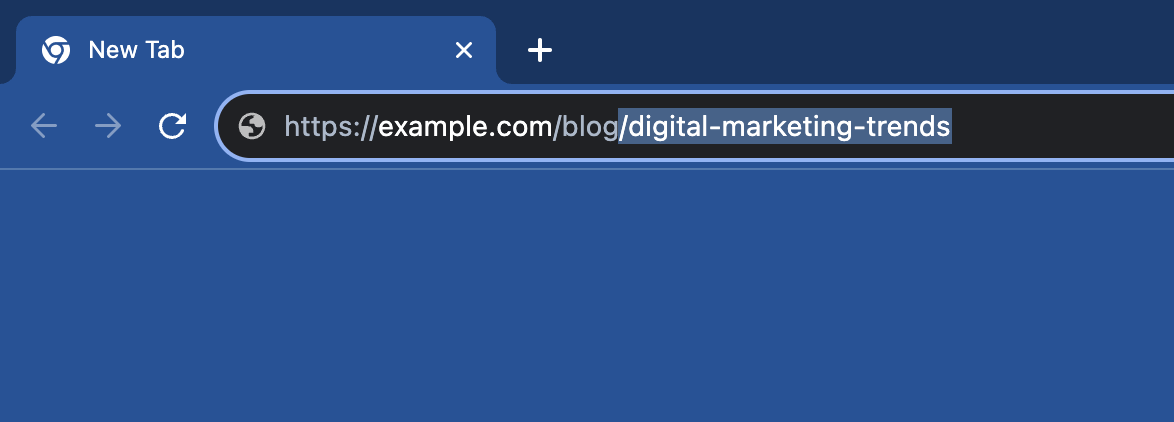
Where Does a URL Slug Appear?
A URL slug is highly visible across the web, which is why it impacts both user trust and SEO performance.
You’ll commonly see a URL slug in the following places:
- Browser address bar: Visitors can read the slug directly in the URL while browsing your website.
- Search engine result pages (SERPs): Search engines often show the page URL slug under the title, and a clean slug looks more trustworthy and clickable.
- Social shares and apps: When someone shares a link, the slug becomes part of what others see and judge before clicking.
- Email links and newsletters: Clean URLs build confidence and reduce the chance of being treated as suspicious or spammy.
- Analytics and reports: Slugs help you and your team quickly identify pages inside tools like Google Analytics, Google Search Console, or internal dashboards.
Because the URL slug is so visible, keeping it short, descriptive, and readable helps users understand your website pages instantly and helps search engines interpret it more accurately.
Do’s and Don’ts of URL Slugs
A good URL slug should be easy to read and clearly connected to the page's topic. Below are practical best practices to follow and common mistakes to avoid when writing URL slugs.
Do’s
- Keep it short and simple: Aim for 3 - 6 meaningful words whenever possible.
- Use lowercase letters: Lowercase URLs look cleaner and help avoid duplicate URL issues.
- Use hyphens between words: Hyphens improve readability and are preferred over underscores.
- Include the primary keyword naturally: Include your main keywords naturally, don't stuff keywords unnecessarily.
- Make it user friendly: Write slugs for real users first, then optimize for search engines.
- Follow a consistent structure: Stick to a standard format of URL slugs across your website for better organization.
- Keep it aligned with page's intent: Ensure the slug clearly matches what users will find on the page.
Don’ts
- Don’t stuff keywords: Adding excessive keywords or repeating keywords makes the URL look spammy and reduces trust.
- Don’t use unnecessary stop words: Words like “and”, “the”, “of” often add length without adding any value.
- Don’t use special characters: Avoid symbols like ?, &, %, #, or ! in URL Slugs.
- Don’t use underscores: Underscores reduce readability and are not ideal for SEO compared to hyphens.
- Don’t create long, auto-generated slugs: Default CMS slugs can be bloated and unclear. Trim them down.
- Don’t change slugs without redirects: If you update a URL, use a 301 redirect to prevent broken links and SEO loss.
- Don’t make it vague: Avoid generic slugs like "page", "post", or "article" that provide no context.
Good vs Bad URL Slug Examples
Let's look at some real examples of what makes a good URL slug and what makes a bad one.
Examples of Good URL Slugs
| URL Slug | Why this is good |
|---|---|
| /how-to-write-meta-titles | Clear, descriptive, and keyword focused. It tells users exactly what the page is all about. |
| /best-budget-smartphones-2026 | Includes intent and freshness (year), making it relevant and compelling for searchers. |
| /beginner-yoga-poses | Short, readable, and specific to the audience (beginners). |
| /seo-audit-checklist | Simple and aligned with search intent - users know they’ll get a checklist. |
| /email-marketing-tips | Clean and easy to remember, while still describing the page content accurately. |
Examples of Bad URL Slugs
| URL Slug | Why this is bad |
|---|---|
| /page?id=12345 | This URL Slug provides no context to users and search engines. It looks auto generated and provides zero meaning. |
| /best-seo-tools-software-tools | Keyword stuffing that looks spammy and reduces trust. |
| /How_To_Write_A_Good_URL!!! | This URL slug uses underscores, uppercase letters, and special characters that hurt readability and consistency. |
| /this-is-the-best-page-for-learning-everything-about-seo-basics | This URL slug is too long and unfocused. Long slugs are harder to read, share, and scan in search results. |
| /post-2023-final-v2-new | This URL slug is meaningless and confusing. Users can’t tell what the page is about from the slug. |
When creating URL slugs, aim to be clear, concise, and accurate. The goal is to help users and search engines understand your page instantly - without clutter or confusion.
Are URL Slugs a Google Ranking Factor?
Yes, URL slugs can influence SEO and act as a lightweight ranking factor when optimized correctly.
Search engines like Google use words in a URL slug to help understand what a page is all about about. In fact, Google’s John Mueller has confirmed that words in a URL can be used as a ranking factor, though he emphasizes this impact is relatively minor compared to other factors.
Search engines also consider URL slugs part of overall URL structure and crawlability — with Google recommending descriptive, easy-to-understand URLs that improve indexing and relevance signals.
However, it’s important to know that URL slugs are a small factor compared to things like content quality, backlinks, and page performance. Even Google characterizes keyword relevance in URLs as a “very lightweight” signal, but one that still provides useful context.
How to Choose the Right URL Slug?
Deciding on a URL slug is like giving your webpage a name. It's the name internet users use to identify and find your content. Here's how to choose the right slug for your content:
- Understand Your Content: Before you decide on a slug, understand the essence of your content. What's the main topic? What's the primary keyword?
- Keep It Relevant: The slug should be relevant to the content of the page. If your article is about homemade pizza recipes, a slug like "/delicious-homemade-pizza" would be appropriate.
- Avoid Using Stop Words: Words like "and", "the", "of", and "in" are considered stop words in SEO. These are typically ignored by search engines and can be left out of your slug to keep it shorter and more readable.
- Avoid Duplicates: Ensure that your slug is unique. Having two pages with the same slug can lead to confusion for both search engines and users.
- Think About Your Audience: Remember, while search engines are important, humans will be reading your URLs too. Think about what they would like to see and what would make sense to them.
- Stay Consistent: If you have a series of related articles, try to keep the slug structure consistent. For example, if you're writing a series of travel guides, you could use slugs like "/travel-guide-paris", "/travel-guide-rome", etc.
FAQs on URL Slug
While there isn't a strict maximum length for a URL slug, it's advisable to keep it under 45 characters for readability. Search engines can handle much longer URLs, but a concise slug is user-friendly and more likely to be remembered.
When you alter a URL slug, you're essentially changing the web address of that specific page. This can lead to broken links. Any previous links directed towards that page will hit a dead end, showing the dreaded 404 error. This mishap can be avoided by setting up a 301 redirect and guiding users from the old URL directly to the new one.
Not quite! The URL is the entire web address you see in your browser, like https://example.com/blog/tasty-pizza-recipes. On the other hand, the slug is just a segment of this address, specifically tasty-pizza-recipes in our example.
Not necessarily. Slugs should be shorter and cleaner than titles while keeping the same intent. Remove unnecessary words and keep it focused on the main topic.
The term "slug" originates from the world of print journalism. In the days of manual typesetting, a slug referred to a piece of type metal cast as a single line of characters. In the digital realm, it's been borrowed to describe a string of words forming a simple, clean URL segment.