
Core Web Vitals
Core Web Vitals are Google’s key user experience metrics for measuring how fast a page loads, how quickly it responds and how stable it is while loading.
- Core Web Vitals comprises of three metrics - LCP (Largest Contentful Paint), INP (Interaction to Next Paint) and CLS (Cumulative Layout Shift).
- LCP measures loading performance, INP measures responsiveness and CLS measures visual stability.
- Google uses these metrics as part of its page experience signals. These metrics can influence search visibility and rankings.
- For best experience, strive to keep LCP scores within 2.5 seconds, INP scores within 200 milliseconds and CLS scores less than 0.1
- You’ll see two types of data - Field data (real visitors) and Lab data (simulated test runs). Both are useful.
- A page is generally considered “good” when each metric is good for at least 75% of visits (not just your own single test run).
What are Core Web Vitals?
Core Web Vitals are a set of metrics created by Google to measure real world user experience on the web. Instead of using just a “speed score,” core web vitals focuses on what visitors actually feel when they load and use a page.
Core Web Vitals answers three simple questions:
- Loading experience - Does the main content load quickly? (measured by Largest contentful paint)
- Interactivity - Does the page respond quickly when a user clicks or taps? (measured by Interaction to next paint)
- Visual stability - Does the page layout stay stable while the page loads? (measured by Cumulative Layout Shift)
Core web vitals helps you measure your website's page's usability - do they feel fast, responsive and steady? Improving core web vitals scores leads to better user satisfaction which in turn can support improved rankings and more traffic to your website.
The 3 Core Web Vitals - and what “Good Scores” Looks Like
Core Web Vitals are made up of three key metrics that reflect real world user experience:
- how fast your main content loads
- how quickly the page responds to user interactions
- how stable the layout remains during loading
Each metric has clear thresholds for what Google considers “Good.”
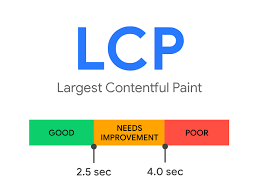
Largest Contentful Paint - LCP
Measures: Loading speed | Measured in: seconds
What it measures - The time it takes for the largest content element - often a hero image, banner, or headline to become visible.
Why it matters - This strongly determines how fast your page "feels" to users.
- Good - Less than 2.5 seconds
- Needs improvement - 2.5 – 4 seconds
- Poor - More than 4 seconds
What usually improves LCP
- Optimize and properly size the hero image (use modern formats and correct dimensions).
- Reduce render blocking CSS/JS so above the fold content can paint sooner.
- Improve server response time (TTFB) with caching, CDN, and backend optimization.
- Preload critical assets (hero image, key fonts) to prioritize the main content.
Interaction to Next Paint - INP
Measures: Interactivity | Measured in: milliseconds
What it measures - How quickly your page responds visually after a user interaction like a click, tap, or key press.
Why it matters - Pages can load quickly but still feel “laggy” if JavaScript blocks the main thread.
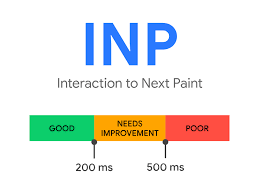
- Good - Less than 200 milliseconds
- Needs improvement - 200 – 500 milliseconds
- Poor - More than 500 milliseconds
What usually improves INP
- Reduce heavy JavaScript - ship less JS, remove unused code, split bundles wisely.
- Break up long tasks on the main thread - avoid blocking work during interactions.
- Defer non critical scripts and load third party tags only when needed.
- Optimize event handlers and rendering - avoid expensive renders on click and tap.
Cumulative Layout Shift - CLS
Measures: Visual stability | Measured in: CLS score (unitless)
What it measures - How much the page layout shifts unexpectedly while loading.
Why it matters - Layout jumps can cause mis-clicks and make the experience feel broken or untrustworthy.
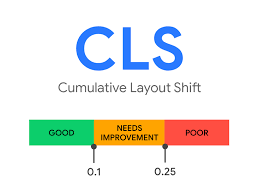
- Good: Less than 0.1
- Needs improvement: 0.1 – 0.25
- Poor: More than 0.25
What usually improves CLS:
- Reserve space for images, ads, and embeds. Set width and height or use aspect-ratio.
- Avoid inserting banners or UI elements above existing content after load.
- Prevent font swaps from shifting text. Use font-display wisely and preload key fonts.
- Stabilize dynamic components e.g accordions, carousels so they don’t push layouts.
Note - A page is generally considered “Good” when these thresholds are met for at least 75% of real user visits.
Why Core Web Vitals matter beyond “SEO”
Core Web Vitals aren’t just “technical SEO metrics.” They describe how your site "feels" to real people. Whether it "feels" fast, responsive, and stable. When that experience is not optimal, users are more likely to abandon your website, bounce, not complete forms and lose trust - even if your content is excellent.
Here’s why improving Core Web Vitals often pays off in the longer haul
- Higher conversions - Faster websites reduce friction in sign-ups, lead forms, and checkouts(especially on a mobile device).
- Lower bounce rate - When the main content appears quickly and the page doesn’t freeze or feels "laggy", users are more likely to stay and explore.
- Better user trust - Layout shifts (CLS) can cause misclicks and “jerky” behavior, which makes a website feel unreliable or spammy.
- Stronger engagement - Improved responsiveness helps people scroll, filter, search, and interact with your UI without frustration.
- Performance on real devices - Core web vitals issues usually hit hardest on mid range phones and slower networks. Fixing them improves the experience for the majority of users, not just developers on fast laptops.
- Competitive edge - When multiple pages offer similar content, user experience can be a differentiator that helps you win clicks and keep visitors.
Core Web Vitals are a practical way to measure and improve real user experience. Better scores typically mean happier visitors, more completed actions, and fewer people leaving before your page even gets a chance to persuade them.
Additional Performance Metrics - Not Part of Core Web Vitals
Core Web Vitals are intentionally a small, focused set of metrics that represent three user experience signals - Largest Contentful Paint, Interaction to next paint and Cumulative layout shift. Google keeps the Core Web Vitals list limited to the only three to give a basic assessment of how fast the page "feels" for users.
That doesn’t mean other PageSpeed metrics are unimportant. It means they’re better treated as supporting metrics - useful for identifying "why a page is slow" and "what needs to be done" to improve a page's overall speed.
Below are common performance metrics you will see in PageSpeed Insights and Lighthouse tests that are not Core Web Vitals.
Speed Index - SI
- Measures - How quickly the visible area of the page is populated during load
- Measured in - seconds
Why it’s not a Core Web Vital: It can vary heavily based on above the fold content and lab test conditions. It’s great for debugging perceived speed, but less consistent as a universal real world user metric.
First Contentful Paint - FCP
- Measures - When the first text or image is painted
- Measured in - seconds
Why it’s not a Core Web Vital: It measures when “something shows up in the visible area” but not when the main content is ready. A page can have a good FCP and still feel slow if the primary content arrives late - LCP addresses that more directly.
Time to First Byte - TTFB
- Measures - How quickly the server starts responding
- Measured in - milliseconds
Why it’s not a Core Web Vital: It mostly captures server and network responsiveness, not the complete user perceived loading experience. It’s best used as a root-cause indicator to see if the web server is to be held responsible for slow loading of web pages.
Total Blocking Time - TBT
- Measures - How long the main thread is blocked, often due to heavy JavaScript)
- Measured in - milliseconds
Why it’s not a Core Web Vital: TBT is a "lab only" metrics and acts as a proxy. Google’s user facing responsiveness metric is INP, TBT is still very useful for diagnosing what’s hurting INP during development.
Time to Interactive - TTI
- Measures - An estimate of when a page becomes "fully interactive"
- Measured in - seconds
Why it’s not a Core Web Vital: “Interactive” isn’t one clear moment for modern websites. Interactivity varies by component and user action, which is why INP is preferred as a more realistic measure.
Core Web Vitals are the primary UX outcomes. The metrics above are your supporting toolkit for diagnosing bottlenecks and prioritizing fixes.
FAQs
They are used as part of Google’s page experience systems. They’re not the only factor, but they can help - especially when relevance is similar.
You should fix that metric which has the worst numbers. If all three metrics are close, then prioritize LCP first, then INP and lastly CLS.
Core web vitals matter considerably more on mobile devices because mobile devices tend to have slower network speeds. Google’s evaluation of site speed is strongly inclined towards a "mobile first"experience.
Absolutely, and they do hurt your core web vitals numbers more often than you think. Analytics scripts, visitor monitoring scripts, live chat widgets, admanager scripts and basically any third party javascript will have an adverse effect in your website core web vital numbers.
Yes a website can have good numbers for core web vitals and still load slowly. For example, a website may have optimised its Largest contentful paint numbers by optimising render blocking resources but has not addressed the heavy HTML page size and lots of uncompressed images. That way, the first fold may load quickly but rest of the page could be slower to load and navigate for users.