
Open Graph Tags
Open Graph tags control how your page looks when someone shares it on social platforms like Facebook, LinkedIn, Twitter, and messaging apps.
- Open Graph tags lets you define the title, description, image, and URL that appears when your link is shared on social platforms.
- Well crafted OG tags can increase clicks, shares, and engagement by making your preview more attractive and accurate.
- If OG tags are missing, platforms often guess the preview content, which can lead to irrelevant text or the wrong image being shown.
- Supporting tags like "og:image:width" and "og:image:height" help platforms render your preview image correctly.
What Are OG Tags?
Open Graph (OG) tags are HTML <meta> elements that tell social media platforms how to display your webpage when it’s shared. Instead of platforms guessing the title, image, or description from your page content, OG tags let you control the preview exactly the way you want.
Originally introduced by Facebook, Open Graph tags are now widely supported across major platforms like LinkedIn, Slack, WhatsApp, and many other apps that generate link previews. X.com (formerly Twitter) primarily uses Twitter Card tags, but it often falls back to Open Graph tags when Twitter specific tags aren’t present.
Open Graph tags are placed inside the <head> section of your webpage. Given below is an example of how Open Graph tags looks in HTML code:
    <meta property="og:title" content="Your Page Title">

    <meta property="og:description" content="A short summary that appears in social previews.">

    <meta property="og:image" content="https://example.com/preview-image.jpg">

    <meta property="og:url" content="https://example.com/page">
When these tags are set correctly, the shared preview becomes more consistent, more clickable, and more aligned with your brand.
Why OG Tags Matter
When someone shares your page on social media or messaging apps, the preview becomes the first impression of your website's content. OG tags help you control that impression instead of leaving it up to the platform to “guess” what content to show.
A well optimized Open Graph setup can make the difference between a link that gets ignored and a link that earns clicks and engagement.
- Control your social preview: Ensure the right title, description, and image appear every time your link is shared.
- Increase clicks and engagement: Strong previews stand out in crowded feeds and encourage more people to tap.
- Improve brand consistency: Consistent visuals and messaging build trust and recognition across platforms.
- Avoid misleading previews: Prevent platforms from pulling random text or irrelevant images from your page.
- Reduce broken or incomplete previews: Proper tags help avoid missing images, incorrect titles, and messy snippets.
In short, OG tags help your content look professional, consistent, and clickable wherever it’s shared.
Core OG Tags You Should Always Include
To generate a clean, reliable preview across major platforms (Facebook, LinkedIn, Slack, WhatsApp, and more), these OG tags should be included on every important page:
- og:title – The headline shown in the preview. Keep it clear, specific, and aligned with the page content.
- og:description – A short summary that explains what the page is about and encourages clicks.
- og:image – The preview image. Use a high-quality, relevant image that looks good when cropped.
- og:url – The canonical URL for the page, ensuring platforms share the correct version of your link.
- og:type – The content type (commonly website or article), helping platforms interpret the page correctly.
Here’s an example of a solid Open Graph setup:
    <meta property="og:type" content="website">

    <meta property="og:title" content="How to Optimize OG Tags for Social Sharing">

    <meta property="og:description" content="Learn best practices to improve link previews and increase clicks on social platforms.">

    <meta property="og:image" content="https://example.com/og-preview.jpg">

    <meta property="og:url" content="https://example.com/page">
Do's and Don'ts of OG Tags
OG tags are all about controlling how your pages look when shared. A few best practices can help you create previews that are consistent, attractive, and more likely to earn clicks across Facebook, LinkedIn, Twitter, and messaging apps.
Do's
- Write unique OG titles and descriptions: Make them specific to each page and aligned with what users will actually find.
- Use a high-quality OG image: Choose a clear, relevant image that conveys what your content is all about.
- Use recommended image dimensions: A common safe standard for open graph image is 1200×630 (1.91:1).
- Use absolute URLs: Always use full URLs for og:image and og:url.
- Set og:type correctly: Use "website" for general pages and "article" for blog/news content.
- Add image width and height: Include "og:image:width" and "og:image:height" to help platforms render previews correctly.
Don’ts
- Don’t leave OG tags missing: If Open Graph tags are missing, platforms will guess previews and often pick the wrong image or random text.
- Don’t reuse the same OG description everywhere: Generic descriptions reduce relevance and make your social shares look repetitive.
- Don’t use low-resolution or tiny images: Small images can appear blurry or may be ignored by platforms, keeping the thumbnail preview blank.
- Don’t block images from crawlers: Avoid protecting OG images behind logins, hotlink protection, or restrictive robots rules.
- Don’t use relative image URLs: Paths like /image.jpg can fail on some platforms. Use full URLs instead.
- Don’t keyword-stuff OG titles: OG tags are for humans in social feeds; awkward keyword stuffing looks spammy and isn't recommended.
- Don’t use misleading titles or images: Clickbait previews may get clicks, but they often increase bounce rate and hurt trust.
How Open Graph Tags actually Look
Here is an example which shows how open graph tags content decides the thumbnail preview on different social sites:
Facebook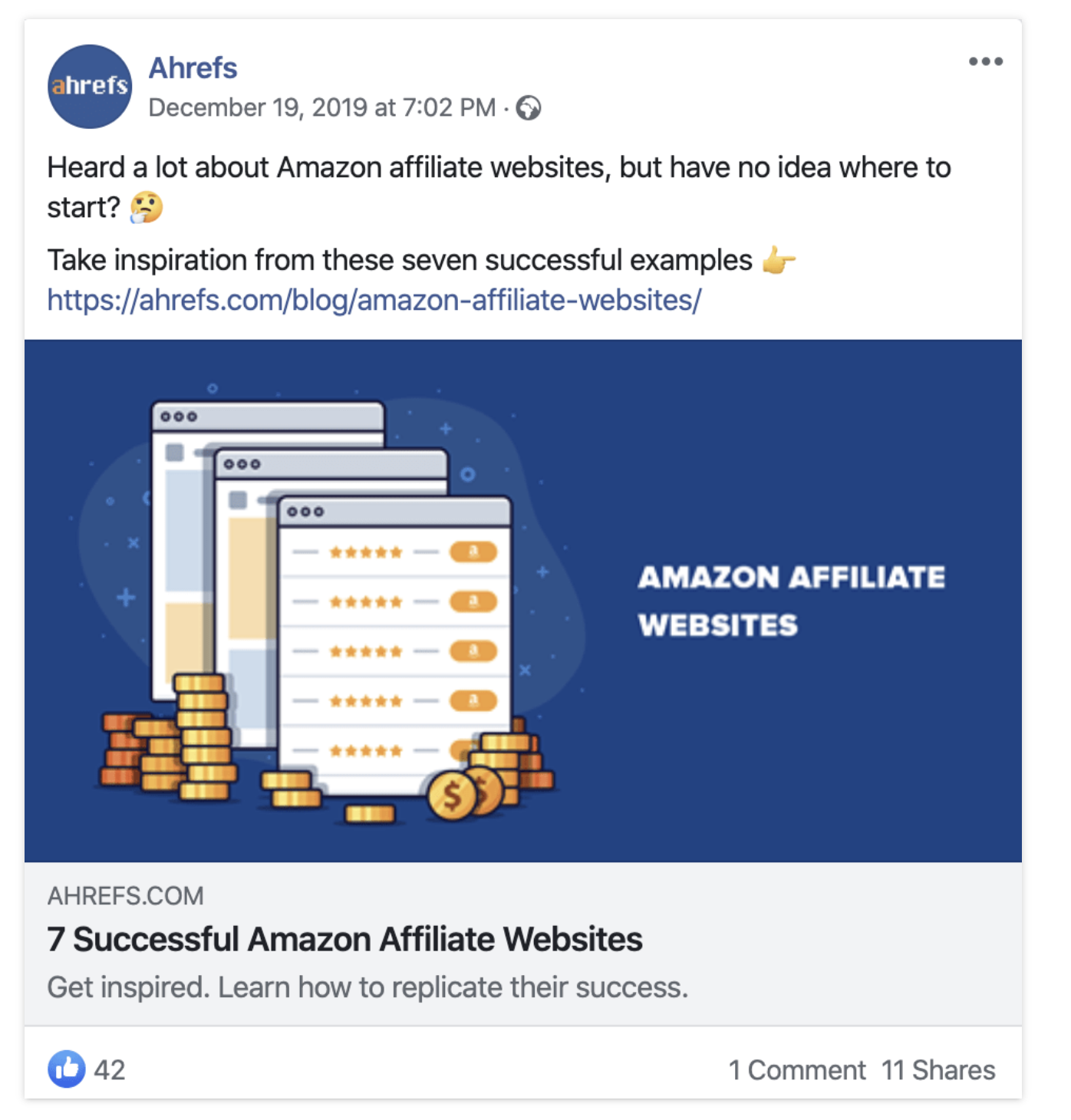 LinkedIn
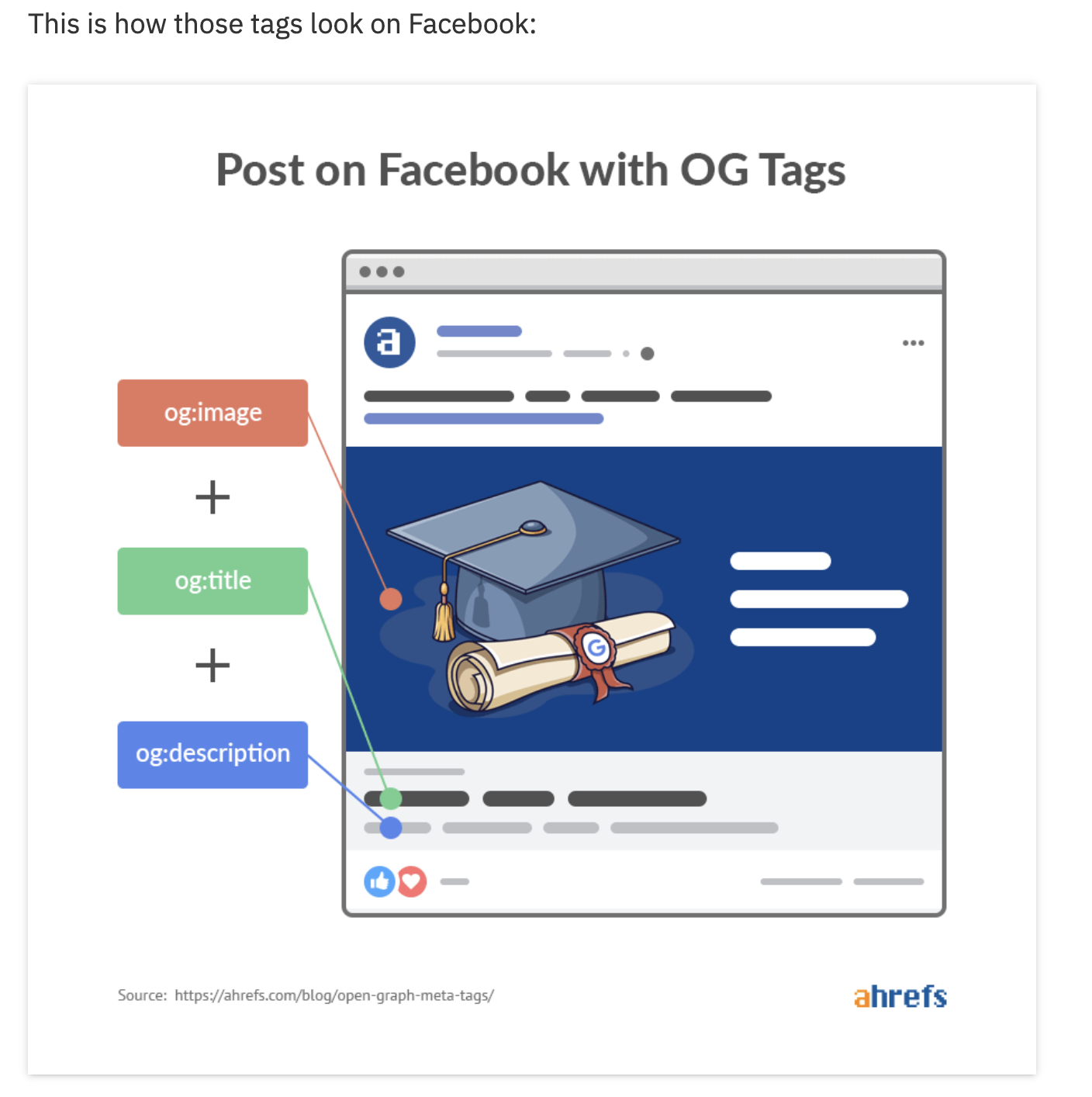
FAQs
A common recommended size is 1200×630 pixels for most platforms.